
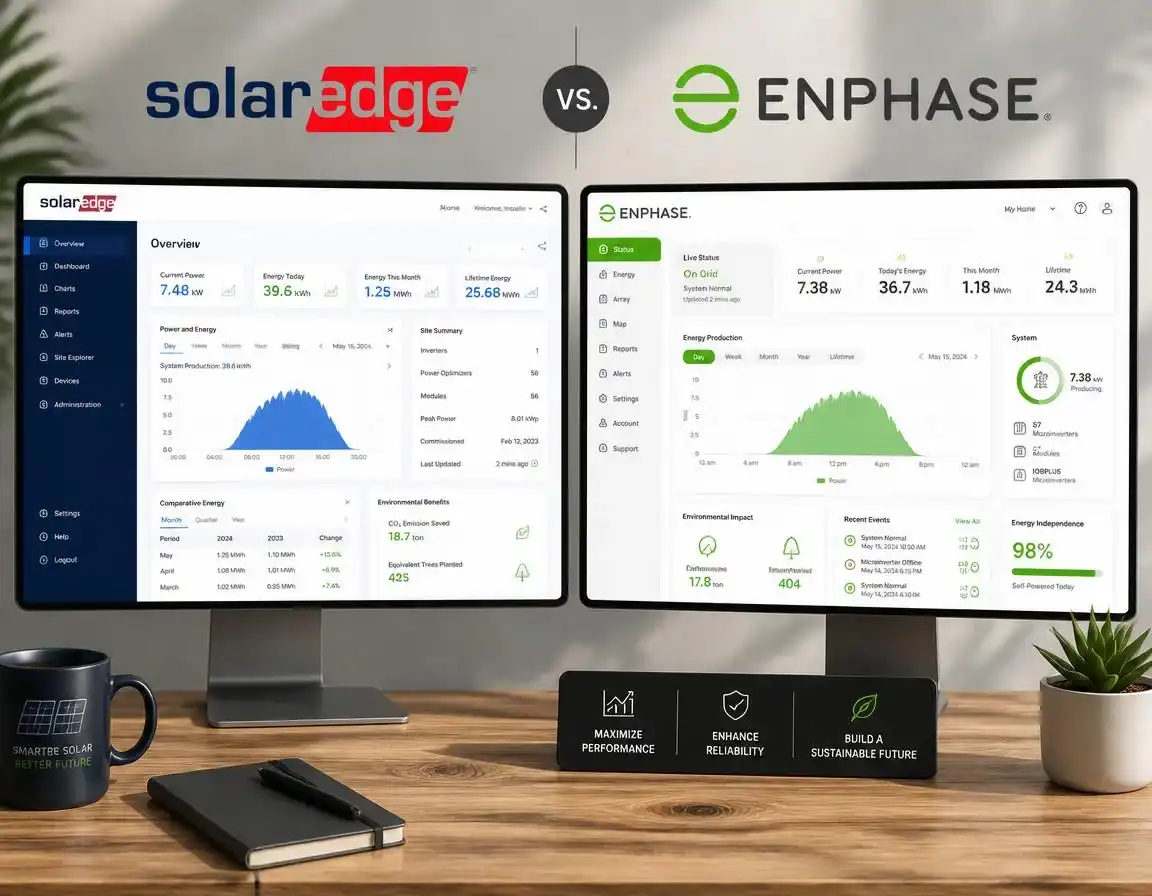
SolarEdge vs Enphase Monitoring

SolarEdge vs Enphase Monitoring: Which App Wins for UK Homes in 2026?
If you’ve had solar panels fitted with SolarEdge or Enphase kit, you’re already living with one of these two apps on your phone. And if you’re still weighing the two up, the monitoring experience is a bigger deal than most installers let on — you’ll be glancing at this app most evenings for the next 25 years, so it’s worth getting right.
I’ve spent time living inside both mySolarEdge and Enphase’s Enlighten app, comparing the two feature by feature, and cross-checking what real UK owners actually say once the installer’s van has left the drive. Here’s the honest, no-fluff comparison for 2026 — no marketing fluff, just what you’ll actually see and use.
Enphase’s Enlighten app is still the more polished, more detailed monitoring experience, with genuine panel-by-panel data included free as standard. mySolarEdge has closed a lot of that gap in 2026 — it’s faster, cleaner, and now bundles an AI energy assistant called Sera. For most homeowners, though, the app you’ll end up using is decided by which inverter is already on your roof — not by the software alone.
In this guide
- How the two systems actually differ
- Head-to-head: every feature compared
- Inside the mySolarEdge app
- Inside the Enphase Enlighten app
- What the monitoring hardware costs
- Warranty: the years that matter
- Battery monitoring & control
- For the tech-curious: refresh speed
- Monitoring and your SEG earnings
- Moving house? Transferring your account
- Our verdict
- FAQs
How the two systems actually differ
Quick recap, because it explains everything else in this article. SolarEdge fits a small power optimiser behind every panel, but the optimised DC power still runs down to one central inverter on your wall, which does the DC-to-AC conversion and talks to the mySolarEdge app. Enphase skips the central inverter entirely — a microinverter sits under every single panel, converts DC to AC right there on the roof, and reports back to Enlighten independently.
That one architectural difference is the reason SolarEdge’s app shows you central-inverter diagnostics that Enphase simply doesn’t need to display, and it’s the reason Enphase can promise no single point of failure. If you want the full engineering breakdown of shading, safety and reliability, we’ve covered that properly in our guide to microinverters versus string inverters and DC optimisers. For this article, I’m focusing purely on what you actually see and tap in the app once your system is switched on — for the wider picture on hardware options, our complete solar panel monitoring guide is worth a read too.
Head-to-head: every feature compared
Here’s the full picture, side by side, based on what each app actually delivers to a UK homeowner in 2026 rather than the marketing copy.
| Feature | mySolarEdge | Enphase Enlighten |
|---|---|---|
| App cost | Free | Free |
| Panel-level production data | Yes — via optimisers | Yes — native, per microinverter |
| Central inverter diagnostics | Yes (temperature, AC output, grid readings) | Not applicable — no central inverter |
| Home consumption monitoring | Yes, with a consumption meter/CT clamp | Yes, with CT clamps |
| Battery charge/discharge control | Yes — SolarEdge Home Battery | Yes — Enphase IQ Battery 5P |
| Built-in AI energy assistant | Yes — “Sera” (added 2026) | Not currently offered |
| Web portal (desktop) | Yes — more detailed than the app | Yes — similar depth to the app |
| Underperforming panel alerts | Colour-coded panel layout view | Visual array map, highlighted instantly |
| Typical cloud data refresh | ~15 minutes | Near real-time in-app |
| Local network / Home Assistant | Modbus TCP (installer must enable) | Native local Envoy gateway integration |
| Ownership transfer on house move | Online form; historically no homeowner fee | Online form; may include an admin fee |
| Best suited to | Shaded roofs wanting one serviceable central inverter | Complex roofs wanting maximum independence & longest warranty |
Inside the mySolarEdge app
mySolarEdge comes in two flavours: the mobile app for quick daily checks, and a web portal for proper digging around. The app gives you an animated power-flow diagram, current production, and a panel layout view where each panel is colour-coded by performance — genuinely handy for spotting the one panel under the chimney that’s quietly underperforming.
Because there’s a central inverter in the mix, mySolarEdge also shows diagnostics Enphase simply can’t — inverter temperature, AC output quality, and grid connection parameters. If your inverter ever throws a fault, the app tells you which one and roughly why, rather than leaving you guessing.
The genuinely new bit for 2026 is Sera, SolarEdge’s built-in AI energy assistant. It lives inside the app at no extra cost and no separate subscription — it learns your household’s usage pattern and times your battery to empty itself just as your panels hit peak output, so less generation gets wasted or clipped. It’s a small thing, but it’s the sort of feature that quietly adds up over a British summer.
✅ mySolarEdge — strengths
- Full central-inverter diagnostics, not just panel data
- Sera AI assistant included free in 2026
- Detailed web portal for deeper historical analysis
- Interface has had a genuine overhaul this year
⚠️ mySolarEdge — watch out for
- Panel view can occasionally be missing on some accounts
- Consumption data needs extra CT-clamp hardware
- Cloud refresh is slower than Enphase’s local option
Typical monitoring hardware cost per panel (UK, 2026)
Inside the Enphase Enlighten app
Enlighten is where Enphase’s “one inverter per panel” approach really earns its keep in the app. Every microinverter reports its own numbers independently, so if one panel drops 20–30% because of shade, debris or a fault, Enlighten flags exactly that panel on a visual array map — no vague “system underperforming” message, just a clear pointer to the culprit.
Add CT clamps at your consumer unit and Enlighten also tracks whole-home consumption alongside production, so you can see your self-consumption at a glance. If you’ve got Enphase’s IQ Battery 5P, that’s managed through the same app, via the IQ System Controller gateway — including Sunlight Backup, which lets your panels keep producing a limited amount of power during a grid outage, a genuinely useful feature during a UK winter power cut.
The IQ8 range also introduced grid-forming microinverters, meaning the system can create a stable AC signal even without the grid present — a technical detail, but one that underpins how Sunlight Backup actually works.
✅ Enphase Enlighten — strengths
- True panel-by-panel data included free, no upsell needed
- Visual array map makes faults obvious immediately
- Near real-time updates, especially over your home network
- Sunlight Backup for limited power during outages
⚠️ Enphase Enlighten — watch out for
- No central-inverter diagnostics — there isn’t one to show
- Occasional Wi-Fi/connectivity hiccups reported after app updates
- Battery integration needs the Enphase IQ ecosystem specifically
What the monitoring hardware actually costs
Neither app charges you a subscription for standard home monitoring — that part’s free either way. What you’re really paying for is the hardware behind it, which is baked into your system’s overall price.
| Item | SolarEdge | Enphase |
|---|---|---|
| Per-panel hardware | ~£40 (power optimiser) | £100–£150 (IQ8 microinverter) |
| Central inverter | Required — sold separately | Not required |
| Monitoring app cost | Free | Free |
| VAT on qualifying UK installs | 0% until 31 March 2027 | 0% until 31 March 2027 |
For a full cost breakdown by inverter type and system size, our micro inverter vs string inverter guide has the detailed 25-year lifetime cost comparison. If you’d rather browse actual hardware, our solar inverters range covers both brands alongside string and hybrid alternatives.
Warranty: the years that matter
This is genuinely one of the biggest practical differences between the two, and it directly affects what your monitoring app will be reporting on in year 15.
Warranty coverage timeline (years)
SolarEdge’s optimisers carry a 25-year warranty, matching your panels, but the central inverter is only guaranteed for 12 years as standard (extendable at extra cost). Enphase microinverters are covered for a flat 25 years, full stop — because there’s no separate central unit to fail, there’s nothing to budget a mid-life replacement for. If a warranty claim ever becomes relevant, our solar panel warranty guide explains exactly what’s covered and what isn’t.
Battery monitoring & control
Both platforms let you monitor and control a battery from the same app you already use for solar — but the underlying setup is different, and it shows up in the monitoring screens.
| Aspect | SolarEdge | Enphase |
|---|---|---|
| Battery product | SolarEdge Home Battery | IQ Battery 5P (modular, stackable) |
| Coupling | DC-coupled | AC-coupled |
| Charge/discharge scheduling | Yes, plus Sera AI optimisation | Yes, via IQ System Controller |
| Outage backup | Whole-home backup available | Sunlight Backup / whole-home options |
Deciding on a battery brand is really its own project — our best solar battery UK guide compares pricing and capacity across every major option, and if you already have panels and just want to add storage later, our guide to adding a battery to an existing solar system covers the compatibility checks that matter.
For the tech-curious: refresh speed & Home Assistant
Skip this bit unless home automation is your thing. If it is: Enphase’s Envoy gateway sits on your home network and can report data roughly every 60 seconds, which makes it genuinely usable for local automations. SolarEdge’s cloud API is rate-limited to around a 15-minute refresh, though installers can sometimes enable a local Modbus TCP connection for faster, real-time polling if you ask at the point of installation.
Neither gap matters for everyday app-checking — both feel “real-time enough” when you’re just having a look after dinner. It only matters if you’re building automations, like diverting surplus solar into an immersion heater the moment output spikes.
Monitoring and your Smart Export Guarantee earnings
Here’s something worth knowing: your monitoring app and your Smart Export Guarantee (SEG) income are more connected than people assume. Using solar electricity yourself saves you roughly 24.67p per kWh at today’s Ofgem price cap, while exporting surplus under SEG typically earns somewhere between 3p and 15p per kWh, depending on your supplier and tariff. Both apps show you exactly how much you’re self-consuming versus exporting, which is genuinely the best way to judge whether it’s worth switching SEG tariff.
For full SEG eligibility criteria and how to apply, see the official Smart Export Guarantee page on GOV.UK. Ofgem also publishes the current list of licensed SEG suppliers on its SEG supplier list.
To register for SEG at all, your installation needs to be fitted by an MCS-certified installer — this applies whether you go SolarEdge, Enphase or anything else. Once you’re registered, it’s worth reviewing rates yearly using our SEG tariff comparison, and our free SEG Income Estimator can model what your specific roof might actually earn.
Moving house? Transferring your monitoring account
This one catches people out. Monitoring access and the remaining product warranty don’t automatically follow the house when it’s sold — the new owner has to actively claim them.
- Locate the transfer-of-ownership page on the manufacturer’s own website (SolarEdge or Enphase), not the app store listing.
- Submit the new owner’s details, along with proof of address or completion, as requested.
- Check for a transfer fee. Enphase’s process has historically included a small admin fee; SolarEdge’s has traditionally not charged homeowners one — but always confirm current terms directly, as processes do change.
- Re-register for SEG under the new owner’s name and bank details once the system’s confirmed as theirs.
Add this to your completion-day checklist alongside your MCS certificate number and SEG registration — it’s a five-minute job on moving day and a genuine headache six months later if it’s forgotten.

Our verdict — which should you choose?
| Your situation | Recommended | Why |
|---|---|---|
| Lightly shaded roof, want easy servicing | SolarEdge | Central inverter is wall-mounted and simple to service; optimisers still give panel-level data |
| Heavily shaded or multi-orientation roof | Enphase | Full panel independence with no single point of failure |
| Want the longest possible warranty, no exceptions | Enphase | Flat 25-year cover, no mid-life inverter replacement to plan for |
| Keen on home automation / Home Assistant | Enphase | Native local network access via the Envoy gateway |
| Want an AI assistant managing battery timing today | SolarEdge | Sera is included free in the app right now |
Honestly, both apps do the core job well in 2026 — free, reliable, and detailed enough for most UK homeowners to actually understand their system. The decision usually comes down to your roof first, and your appetite for extra features second. If you’re still at the quote stage, it’s worth asking your installer to show you both apps live on their phone before you commit to either.
Not sure which inverter suits your roof?
Speak to an MCS-certified installer who fits both SolarEdge and Enphase — they’ll assess your shading and give you a straight recommendation.
Find an installerFrequently asked questions
Is SolarEdge or Enphase monitoring better for UK homes?
For most UK homes, Enphase Enlighten edges it on polish and true panel-by-panel detail, all included free. mySolarEdge has closed much of that gap in 2026 and adds handy touches like the Sera energy assistant. If you already have a SolarEdge or Enphase inverter fitted, you’ll use that brand’s app anyway — the bigger decision is the inverter architecture itself, not the app.
Do I have to pay for the SolarEdge or Enphase monitoring app?
No. Both mySolarEdge and Enphase Enlighten are free to download and use for everyday homeowner monitoring, including panel-level production data and battery control if you have a compatible battery. Optional paid tiers exist for installers and power-users wanting extra analytics, but typical UK homeowners never need to pay a penny for monitoring.
Can I keep using my SolarEdge or Enphase app if I move house?
Not automatically. Both companies require the new homeowner to complete an online ownership transfer before they can access monitoring and the remaining warranty. It’s a simple form-based process, but it’s easy to forget during a house move, so add it to your completion-day checklist alongside your MCS certificate and SEG registration.
Figures in this guide reflect UK pricing, warranty terms and SEG rates current as of July 2026, drawn from manufacturer documentation and UK solar industry data. Costs, app features and warranty terms can change — always confirm exact numbers with your MCS-certified installer before buying.


One Comment